How to Sell on Amazon India: Beginner’s Guide (2026)
 GrowthLife
21 Oct 2026
10 min read
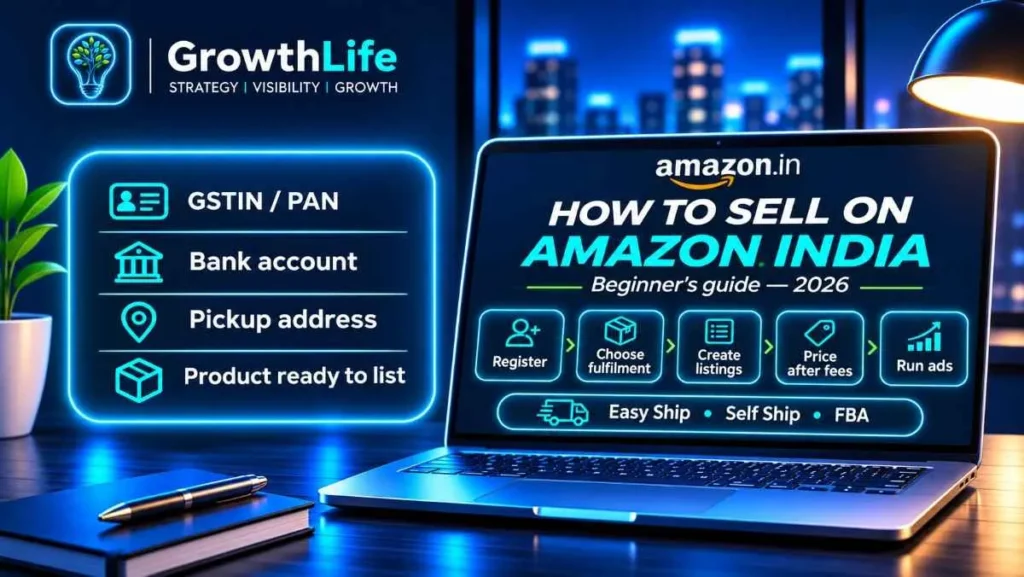
To sell on Amazon India, register free as a seller at sell.amazon.in with your GSTIN (or PAN for GST-exempt goods), bank account and pickup address. Then choose how you’ll ship (Easy Ship, Self Ship or Fulfilled by Amazon), list your products with strong titles and images, price them after working out Amazon’s fees, and use small ad campaigns and good service to get your first orders and reviews.
Quick summary
- Step 1: pick products with real demand and a healthy margin after fees.
- Step 2: get GST (unless you sell only exempt goods) and register on Seller Central.
- Step 3: choose a fulfilment method: Easy Ship, Self Ship or FBA.
- Step 4: build listings that match how customers search.
- Step 5: price using a fee calculator; since 16 March 2026 many products under ₹1,000 pay zero referral fee.
- Step 6: launch with Sponsored Products ads, ship on time and request reviews the right way.
Is selling on Amazon India right for you?
Amazon.in suits you if you have products people already search for, you can keep stock available, and you can dispatch on time every day. It works well for manufacturers, wholesalers moving into retail, resellers of branded goods and D2C founders who want reach beyond their own website.
It is harder if your product needs a long explanation before someone buys, your margin is thin after shipping, or you can’t handle returns. Do the maths first. Our sibling brands sell daily on marketplaces, and the products that work best are the ones where the fee and return costs were known before the first purchase order went out.
Eligibility and what you need
Any Indian business, from a home-based proprietor to a private limited company, can sell on Amazon.in. You need:
- A mobile number and email ID
- A GSTIN for taxable products (most products). If you sell only GST-exempt goods like books, you can register with PAN details instead.
- A bank account in the business or proprietor’s name
- A pickup address in the same state as your GST registration
- At least one product ready to list
Small sellers below the GST threshold who sell only within one state may be able to use a GST enrolment ID instead of a GSTIN under Notification 34/2023-Central Tax. Whether Amazon offers this route for your category can change, so check during signup. The full documents table and every signup screen are covered in our Amazon seller registration guide.
Documents checklist
| Item | Required? | Tip |
|---|---|---|
| GSTIN | Yes, for taxable goods | Legal name must match PAN and bank. |
| PAN | Yes | Main tax ID for exempt-only sellers. |
| Bank account + IFSC | Yes | Payouts land here. |
| GST certificate (REG-06) | If auto-verification fails | Upload with Annexures A and B. |
| ID proof of owner/signatory | Usually during verification | Clear scan, all corners visible. |
| Category licences (e.g. FSSAI) | For some categories | Check the category page before buying stock. |
| Brand trademark | Optional | Needed for Amazon Brand Registry and its tools. |
How to sell on Amazon India: step-by-step
- Choose what to sell. Look for products with steady search demand, a price where your margin survives fees and returns, and a size and weight that ship cheaply. Search the product on Amazon.in, read the top listings’ reviews for complaints you can fix, and note the price range on page one. Avoid gated or heavily regulated categories for your first products unless you already have licences.
- Get your GST and paperwork sorted. Apply for GST on gst.gov.in if you don’t have it. Keep PAN, bank details and an address proof ready. If you’re still naming your business, use our business name generator and check the name isn’t already a trademark.
- Register on Seller Central. Go to sell.amazon.in, click “Start Selling”, enter your GSTIN, verify it (Amazon says this can take up to 72 hours), choose a store name, add your pickup address and bank account, and set a default tax code.
- Choose your fulfilment method. Easy Ship, Self Ship or FBA. The comparison below helps; most beginners start with Easy Ship.
- Create your listings. If the exact product already exists on Amazon (same brand and model), add your offer to that page. If it’s your own brand, create a new listing with a keyword-led title, five bullet points, a description, correct HSN and tax code, and at least six images. Amazon requires at least one listing before you can launch.
- Price after the fee maths. Enter your selling price, category, weight and fulfilment method into our Amazon fee calculator to see what Amazon deducts, then check the result in the profit margin calculator with your product cost, packaging and expected returns.
- Launch your store. Click “Start selling”. Keep stock counts accurate from day one so you never accept an order you can’t ship.
- Drive the first traffic. Start a Sponsored Products automatic campaign with a modest daily budget. After 10 to 14 days, move converting search terms into a manual campaign and add irrelevant terms as negatives.
- Fulfil every order on time. Pack well, confirm dispatch before the deadline, and answer buyer messages within 24 hours. Late dispatch and cancellations hurt your account health and your visibility.
- Get paid and reinvest. Amazon says you become eligible for payment 7 days after an order is delivered. Reconcile each settlement against your orders, then put profits into stock for your best sellers.
Easy Ship vs Self Ship vs FBA
| Easy Ship | Self Ship | Fulfilled by Amazon (FBA) | |
|---|---|---|---|
| Who stores stock | You | You | Amazon fulfilment centre |
| Who packs | You | You | Amazon |
| Who delivers | Amazon picks up and delivers | Your own courier | Amazon |
| Shipping fee | Weight handling fee, from ₹38 per item per Amazon’s beginner guide | Your courier’s cost | Weight handling fee, from ₹28 per item, plus pick & pack and storage |
| Prime badge | Generally no | No | Yes |
| Best for | Beginners testing products | Bulky items or sellers with cheap courier rates | Proven fast sellers |
Amazon’s “Try FBA” offer is worth a look once you have a product that sells. For sellers who have never sent stock to a fulfilment centre, it waives inbound transport (capped at ₹1,000), storage and removal fees for the first 3 months or first 100 units, whichever comes first. Referral, closing and weight handling fees still apply, and the first shipment must be at least 10 units. Check the current terms on Amazon’s FBA page before you rely on it.
What it costs to sell on Amazon India
Amazon’s formula is simple: selling fee = referral fee + closing fee + shipping fee + other fees.
- Referral fee: a category-based percentage of the selling price, starting from 2%. From 16 March 2026, products under ₹1,000 pay zero referral fee across 1,800+ categories.
- Closing fee: a fixed fee by price band and channel. For Self Ship, Amazon cut it to ₹20 for items under ₹300 and ₹26 for ₹300 to ₹500 in its 2026 fee change.
- Shipping / weight handling: depends on weight, volume and distance for Easy Ship and FBA.
- Other fees: FBA pick and pack, storage and removals; advertising if you run ads.
- Taxes: GST is charged on Amazon’s fees, and TCS (GST) and TDS (income tax) are deducted from payouts. Both can be claimed back in your filings.
Our Amazon seller fees guide explains each line with examples. Amazon revises its rate card from time to time, so always check the latest numbers in Seller Central.
Build listings that actually rank
Title
Lead with the words people type: product type, then brand, key feature, material, size, quantity. “Wooden Spatula Set of 3, Neem Wood, Non-Stick Safe, 30 cm” beats a clever brand name with no product words. Keep it readable; stuffing keywords makes customers scroll past.
Bullet points
Five bullets that answer the questions in your competitors’ negative reviews: size, material, durability, what’s in the box, how to use or clean it, warranty or return terms.
Images
Main image on pure white, product filling most of the frame. Amazon recommends at least 1,000 pixels on height or width so zoom works. Add lifestyle shots, a dimensions graphic, close-ups and an in-the-box image. On mobile, the image gallery is the listing.
Backend keywords
Add synonyms, Hindi or regional terms customers use, and common spelling variants in the search terms field, not in the title.
A+ Content
If you own the brand and enrol in Brand Registry, A+ Content lets you add comparison charts and richer visuals below the fold. It helps undecided buyers.
Pricing, reviews and ads: getting your first sales
- Price inside the page-one band. Look at the five to ten closest competitors and price within their range unless your listing is clearly better.
- Use launch offers carefully. A coupon or a small discount helps a new listing convert, but check the margin after fees first.
- Request reviews only through Amazon. Use the “Request a Review” button after delivery. Never pay, refund or gift anyone for a review; it can get your account suspended.
- Keep ads small and specific. Start with automatic campaigns, then manual exact-match on terms that convert. Watch your advertising cost against profit, not just sales.
- Protect account health. Keep cancellation and late dispatch low. Healthy accounts keep the Buy Box and get more visibility.
Common mistakes and how to fix them
| Mistake | Fix |
|---|---|
| Buying a lot of stock before testing | Start with small quantities on Easy Ship; reorder what sells. |
| Pricing without fees and returns | Run every SKU through the fee and margin calculators. |
| Thin listings with 2 to 3 photos | Use 6 to 9 images and fill every bullet. |
| Wrong GST rate or HSN code | Set the correct tax code per listing, not just the default. |
| Using another brand’s name in your title | Only use brands you own or are authorised to sell. |
| Ignoring buyer messages | Reply within 24 hours; it affects account health. |
| Running ads with no negatives | Review search terms weekly and block wasted spend. |
Amazon vs Flipkart vs Meesho
| Amazon.in | Flipkart | Meesho | |
|---|---|---|---|
| Commission headline (2026) | Zero referral fee under ₹1,000 in 1,800+ categories | Zero commission under ₹1,000 (announced Nov 2025) | 0% commission |
| GST | Needed for taxable goods | Needed for taxable goods | Advertises in-state selling without a regular GSTIN |
| Warehouse option | FBA (Prime badge) | Flipkart fulfilment | Seller ships via Meesho’s logistics |
| Strength | Branded goods, Prime buyers, higher order values | Fashion, electronics, big sale events | Value pricing, smaller towns |
| Read next | Amazon registration | How to sell on Flipkart | Meesho registration |
Zero commission doesn’t mean zero cost on any of them: shipping, closing or fixed fees and returns still apply. Compare platforms using real numbers from our Amazon and Flipkart calculators. For Flipkart signup, see our Flipkart seller registration guide.
A simple first-90-days plan
- Days 1 to 14: register, list 5 to 10 products with full images, set up an automatic ad campaign.
- Days 15 to 45: study search terms and conversion, fix weak listings, request reviews on every delivered order.
- Days 46 to 90: double down on the two or three products that sell, consider FBA for them, and cut what doesn’t move.
Want your listings built for page one?
GrowthLife sells its own products on marketplaces every day, so we know what a listing needs to compete. Our Page-1 Amazon Listing service covers keyword research, titles, bullets, backend terms and image planning for your products. Prefer to do it yourself? Start with our free seller tools.
FAQs
How do I start selling on Amazon India?
Register free at sell.amazon.in with your GSTIN (or PAN if you sell only GST-exempt goods), bank account and pickup address. Choose Easy Ship, Self Ship or FBA, create at least one product listing, launch your store, then improve listings and run small ads to get early orders.
How much money do I need to start selling on Amazon?
Registration and listing cost nothing. Your real costs are inventory, packaging, product photos, GST registration help if needed, and a small ads budget. Amazon’s selling fees are deducted from each order, so work out your margin per product with a fee calculator before you buy stock.
Can I sell on Amazon India from home?
Yes. Many sellers run as sole proprietors from home. Your home address can be your GST principal place of business and your pickup address, as long as it is in the same state as your GST registration.
Which is better for beginners: Easy Ship or FBA?
Most beginners start with Easy Ship because there is no stock to send to Amazon’s warehouse and you learn what sells first. Move your fast-selling products to FBA once demand is steady, to get the Prime badge and faster delivery. Amazon’s Try FBA offer waives some FBA costs for first-time FBA sellers.
How long does it take to get the first order on Amazon?
There is no fixed timeline. It depends on demand for your product, competition, listing quality, price and whether you run ads. A well-built listing in a category with real search demand, backed by a small Sponsored Products campaign, gives you the best chance of early orders.